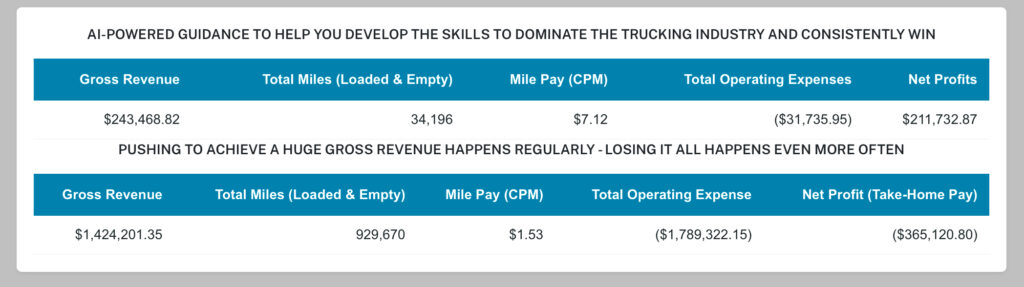

BELOW ARE THE MOST COMMON OPERATING RESULTS—AND WHAT’S DESTROYING TRUCKING COMPANIES TODAY.

AGENTS: USE THIS TRAINING GUIDE AND YOUR APP TO COACH CLIENTS THROUGH THEIR TRAINING.
– Your clients and prospects only have access to the app. Walking them through this training helps paint a clear picture of their independent success and shows how valuable this service will be in helping them reach their goals. In your clients’ eyes, this is your company, so building a strong connection is critical.
STEP 1. TO GET A DRIVER’S ACTIVE ATTENTION, FIRST BUILD YOUR CONNECTION
A CLIENT HAS ALREADY DOWNLOADED THE APP / A PROSPECT HAS NOT DOWNLOADED THE APP Connecting with your clients requires you understanding their needs – (CLICK HERE)
- “Hi, my name is David. I’m a Profit Consultant with Eye1. Are you still driving trucks?”
- Now find out what type of driver they are;
Are you a company driver, or have you switched to being an owner-operator? - Ask the Client the Key Questions:
“Would you accept a load paying $22,800 for just 10,930 total miles (loaded and empty total miles)?”
- Let the client fully explain their answer before moving on.
- Use their response to build a real conversation—ask why they answered that way so you can understand their situation and build a connection.
- As a company driver, do you really know what your employer’s profit and loss looks like? When a trucking company goes bankrupt, drivers are usually the last to know—and the first to feel the financial pain.
* Let me help you move out of that risky situation and into your own independent success. - Text your clients a flash card from the video downloads folder so they can see what you’re offering and how it will help them start achieving results for themselves.
- SELECT THE DRIVER TYPE RESPONSE
COMPANY DRIVERS – RESPONSES; A company driver is operating their employer’s truck – (CLICK HERE)
- Ask: “Are you thinking about becoming an Owner Operator?”
- Ask: “What do you know about being Independent?”
- NOW EXPLAIN TO THE CLIENT WHAT WE DO AND HOW WE HELP COMPANY DRIVERS
- CDL PROFIT TRAINER APP; We help Company Truck Drivers train now as if they were real Owner Operators—before they buy any equipment. This required training shows you how the industry really works, why so many trucking companies fail, how to avoid massive losses, and how to build steady profits in any market.
- The main objective for Company Drivers using this CDL Profit Trainer app is to understand PES and how to use it to build consistent profit. You’ll learn what truly builds profits, what destroys them, and how to develop your own profit-building skills through PES.
- You’ll train like an actual Owner Operator with zero risk of losing everything, because you’re not independent yet. You’ll use your employer’s truck and your driving time for app training—so you can take control now and start building your own path to independent success while still on the company payroll.
- In this enrollment training, you’ll get hands-on, behind-the-wheel insight into how the market really works for independent truckers. We’ll train using the CDL Profit Trainer app—an AI-powered system built from the driver’s seat to stop cash bleed and build consistent profits in any market. You’ll see why so many trucking companies fail, which actions create profit or massive losses, and exactly how you must operate to build your own independent success and build consistent profits in any market.
- Right now, our active clients are consistently achieve over $60,000 for every 10,000 total miles (loaded and empty). And through using our systems you will be able to understand and see how you can do the same for yourself.
- CDL PROFIT TRAINER APP; First, we walk you through a short enrollment training using our CDL Profit Trainer app so you can understand our simple systems and why using them is so important for changing your unique situation.
- After Enrollment Training; After you finish this brief enrollment training (about 20 minutes), you’ll be able to keep using the CDL Profit Trainer app for about one week. During that time, you can use it every workday on your own for self-training and to get comfortable with it.
After that, you can activate your one-year service, which also gives you access to your online Dashboard with additional training materials.
OWNER OPERATOR – RESPONSES; An Owner Operator is operating using their own truck – (CLICK HERE)
- Ask: “What do you know about being Independent?”
- Then ask them: “Would you take this load? Why?
- Let the client explain their answer, and use what they share to build a stronger connection with them.
- NOW EXPLAIN TO THE CLIENT WHAT WE DO AND HOW WE HELP OWNER OPERATORS FIX THEIR UNIQUE SITUATION
- OWNER OPERATORS APP; Now explain, how our AI-powered systems were built from behind the wheel and have been tested and proven for over 10 years to fit—and fix—any operation turning it into a profit building machine in any market.
- For your active operation, once your service is activated you’ll be using the Owner Operators app. When you start using this app, keep running your operation as you normally do—but focus on building and maintaining a strong positive PES status in your daily decisions.
- This will help you master the industry, gain clarity with the load boards based on your unique situation, and see how simple, repeated profit-building actions can help you understand how and why our clients consistently achieve over $60,000 for every 10,000 total miles (loaded and empty).
- We want to help you do the same—based on your unique situation.
Priority #1 in trucking: Know what builds consistent profits and how to avoid massive losses in any market. - CDL PROFIT TRAINER APP; First, we walk you through a short enrollment training using our CDL Profit Trainer app so you can understand our simple systems and why using them is so important for changing your unique situation.
- After Enrollment Training; After you finish this brief enrollment training (about 20 minutes), you’ll be able to keep using the CDL Profit Trainer app for about one week. During that time, you can use it every workday on your own for self-training and to get comfortable with it.
After that, you can activate your one-year service, which also gives you access to your online Dashboard with additional training materials.
MAKE SURE THE CLIENT IS NOT IN A LEASE PURCHASE PROGRAM – IF THEY ARE (CLICK HERE)
- Use this information to help the client seriously rethink their decision. This will help you earn their trust and spark curiosity about how you can guide them toward a better independent direction.
- When you run a trucking business using systems that weren’t built from the driver’s seat, your business has a 98% chance of failure. In a volatile market, profit requires real, behind-the-wheel judgment—not just basic math.
- For company drivers, there’s a brutal truth: if the company shuts down, you have zero protection.
USE REAL-LIFE LAYOFFS AND BANKRUPTCIES TO BUILD THE CLIENT’S TRUST IN YOUR GUIDANCE – (CLICK HERE)
- Most trucking companies use systems built by people who’ve never driven a truck, and it leads to massive losses. To cover those losses, they offer lease-purchase programs and let Owner Operators lease their trucks on with the company.
- This is bad for drivers because the trucking company is dumping all of its operating losses onto them.
STEP 2. NOW THAT YOU HAVE THEIR ATTENTION, START BY EXPLAINING HOW PES WORKS.
IF THE PROSPECT NEEDS TO DOWNLOAD THE APP – (CLICK HERE)
If the client hasn’t downloaded the app, text them the link https://www.eye1.net along with your Client ID, and walk them through creating their account. Your Client ID needs to be used for the “Do you have any detention updates, Agent?” question. This is how you lock this prospect to your account.
- Now have the client log in to the app.
- As the Agent you need to login to the app too so you can walk along with the client throughout their training.
- Begin the training by explaining that every truck has its own unique PES (Profitability Evaluation Status).
- PES is unique to that truck and is the key to building consistent profit in any market.
- Explain how PES and the truck’s odometer work together when the truck is operating: every time the truck moves, the odometer goes up—and with every mile, the PES indicator changes. It moves positive when the driver is building profits and negative when they’re accumulating losses.
- After this explanation, continue with the training steps listed below.
AFTER EACH LOAD SUBMISSION. CHECK THE PES — IT REVEALS WHAT’S REALLY HAPPENING IN TRUCKING TODAY.
STEP 3. INDEPENDENT OWNER OPERATORS: MUST PERSONALIZE THE APP TO YOUR UNIQUE SITUATION. When you’re independent, in the driver’s seat to build your profits, you need a system personalized to your unique situation. That’s why you must UPDATE – Truck’s Starting Odometer in the app to match your truck’s odometer—because every time your wheels move, you’re spending money.
PERSONALIZING THE APP IS IMPORTANT FOR YOUR PES ACCURACY – (HOW TO INFO CLICK HERE)
To update the app’s starting odometer to match the truck (for demo, enter 1234):
SET THE APP STARTING ODOMETER TO; 1234 VERY IMPORTANT TO COMPLETE TRAINING
- Tap the Profile Icon (4th button at the bottom).
- Check the box labeled Set/Update – Truck Starting Odometer.
- Enter the new odometer reading in UPDATE – Truck’s Starting Odometer. (for training use 1234)
- Tap the UPDATE button at the bottom of the page.
STEP 4. HOW TO SUBMIT COMPLETED LOADS INTO THE APP TO GENERATE YOUR PES RESULTS. YOUR PES GIVES CLARITY IN MASTERING LOAD BOARDS, ADAPTING TO MARKET FLUCTUATIONS, AND CONSISTENTLY BUILDING PROFITS – (CLICK HERE)
In this section, you’ll get hands-on and see what’s really happening in trucking—and why so many operations fail. Follow the steps carefully and pay close attention.
HOW TO SUBMIT A LOAD IN THE APP (HOW TO INFO CLICK HERE)
- Tap the Folder Icon (2nd button at the bottom).
- Tap the Plus Icon at the top next to the Load Reports title.
- After each submission, refresh your Training Center Dashboard to see updates in your demo account and follow the PES status as it changes.
Enter These 5 Load Submissions Listed Below into the App and Follow How the PES Status Changes
TRAINING CLIENT KEY; Use your app to guide the client through submitting their first two loads.
After the 2nd load submission, have the client tell you each step needed to submit the remaining loads and find the PES.
* In the CDL Profit Training app, load pay is preset to $600. Only active operations using the Owner Operators app can enter real load payments. For training, we use a fuel price of $3.00.
* If the PES shows in parentheses (for example, ($3,547.89)), it means your PES is negative and you’re taking losses. As the truck moves and miles increase, your PES changes—positive means profit, negative means loss.
1. First Load Submission: Picked up in BALTIMORE, MD → delivered to SAVANNAH, GA (1,490 miles, 39,810 lbs)
– The truck ran 1,490 miles + the truck’s starting Odometer of 1,234 – Submit the Load into the App (numbers only).
Now that this 1st load has been delivered and the truck’s odometer has increased, submit this completed load in the app using the truck’s new odometer reading. 2,724 for New Ending Odometer using a Fuel Price of $3.00
SUBMIT THE ACTUAL LOAD PAY INTO THE APP; $3,500
2. Second Load Submission: Picked up in ASHEVILLE, NC → delivered to MONTGOMERY, AL ( 2,558 miles)
– The truck ran 2,558 miles + the truck’s last completed load Odometer of 2,724 – Submit the Load into the App (numbers only).
Now that this 2nd load has been delivered and the truck’s odometer has increased, submit this completed load in the app using the truck’s new odometer reading. 5,282 for New Ending Odometer using a Fuel Price of $3.00
SUBMIT THE ACTUAL LOAD PAY INTO THE APP; $6,400
3. Third Load Submission: Picked up in SANTA ROSA, CA → delivered to PEORIA, IL (902 miles)
– The truck ran 902 miles + the truck’s last completed load Odometer of 5,282 – Submit the Load into the App (numbers only).
Now that this 3rd load has been delivered and the truck’s odometer has increased, submit this completed load in the app using the truck’s new odometer reading. 6,184 for New Ending Odometer using a Fuel Price of $3.00
SUBMIT THE ACTUAL LOAD PAY INTO THE APP; $5,300
4. Fourth Load Submission: Picked up in Bloomington, IN → delivered to RICHMOND, SC (2,384 miles)
– The truck ran 2,384 miles + the truck’s last completed load Odometer of 6,184 – Submit the Load into the App (numbers only).
Now that this 4th load has been delivered and the truck’s odometer has increased, submit this completed load in the app using the truck’s new odometer reading. 8,568 for New Ending Odometer using a Fuel Price of $3.00
SUBMIT THE ACTUAL LOAD PAY INTO THE APP; $3,600
5. Fifth Load Submission: Picked up in HOUSTON, TX → delivered to KENT, WA (2,362 miles)
– The truck ran 3,596 miles + the truck’s last completed load Odometer of 8,568 – Submit the Load into the App (numbers only).
Now that this 5th load has been delivered and the truck’s odometer has increased, submit this completed load in the app using the truck’s new odometer reading. 12,164 for New Ending Odometer using a Fuel Price of $3.00
SUBMIT THE ACTUAL LOAD PAY INTO THE APP; $4,000
NOW ASK THE CLIENT FOR THEIR PES, MILE PAY, AND TOTAL MILES.
WHAT DOES IT TELL YOU ABOUT THIS TRUCKING OPERATION?
6. Ask the client:
“In the app, under Load Reports, what is the Actual Load Pay (Gross) and the Total Miles?
(This should be $22,800 for 10,930 total miles.
- Have the client evaluate a $22,800 load for 10,000 miles at a fuel price of $3.00.
- Then ask them: “What is the Fuel Usage Loss/Gain result?”
(The answer should be -$19,737.67)
- Ask the client how they would feel sitting in the driver’s seat as an Owner Operator, running all those miles only to end up with a major loss?
- No do you see why so many trucking businesses fail today?
THE IMPORTANCE OF USING THE APP LOAD ANALYZER
- The Load Analyzer lets Owner Operators evaluate their loads before they book them. They can see an estimated outcome to decide if a load will increase profits or cause losses.
- It also helps Company Drivers understand why load analysis is so important, start evaluating their day, and build the habits needed for consistent independent success.
7. OPTIONAL; Now go through each of the 5 loads with the client. Have them evaluate each load using the Load Analyzer and decide which one of the 5 completed loads was profitable.
STEP 5. Now the Enrollment Training is Completed – What you can tell the client (BELOW).
Agents; go to your dashboard and mark the client’s Enrollment Training as completed.
In any business, priority #1 is simple: build consistent profits and eliminate massive losses. As the Profit Consultant, this is your client. You are their direct contact, and you must treat this like your business—training them to build their own independent trucking company and, most importantly, to create consistent profits in any market. During the free trial period, your goal is to make sure clients are consistently using the app. This is how you create their need for the service, which leads to successful sales for you.
TO CLOSE OUT THIS ENROLLMENT TRAINING WITH THE CLIENT, SAY SOMETHING LIKE: We’ve just completed your enrollment training. Now you can start your one-week free trial using the app for your daily self-training. Use it every workday this week to get more familiar with the self-training system. If you have any questions, just text me directly and I’ll help you. Next week, I’ll contact you to get you started with your full service. In the meantime, keep following the basic training steps. Right now, our active clients are consistently achieving over $60,000 for every 10,000 total miles (loaded and empty). By using these systems, you’ll be able to understand and see how you can do the same for yourself.
Connecting with your clients requires you understanding their needs – (CLICK HERE)
- “Hi, my name is David. I’m a Profit Consultant with Eye1. Are you still driving trucks?”
- Now find out what type of driver they are;
Are you a company driver, or have you switched to being an owner-operator? - Ask the Client the Key Questions:
“Would you accept a load paying $22,800 for just 10,930 total miles (loaded and empty total miles)?”
- Let the client fully explain their answer before moving on.
- Use their response to build a real conversation—ask why they answered that way so you can understand their situation and build a connection.
- As a company driver, do you really know what your employer’s profit and loss looks like? When a trucking company goes bankrupt, drivers are usually the last to know—and the first to feel the financial pain.
* Let me help you move out of that risky situation and into your own independent success. - Text your clients a flash card from the video downloads folder so they can see what you’re offering and how it will help them start achieving results for themselves.
COMPANY DRIVERS – RESPONSES; A company driver is operating their employer’s truck – (CLICK HERE)
- Ask: “Are you thinking about becoming an Owner Operator?”
- Ask: “What do you know about being Independent?”
- NOW EXPLAIN TO THE CLIENT WHAT WE DO AND HOW WE HELP COMPANY DRIVERS
- CDL PROFIT TRAINER APP; We help Company Truck Drivers train now as if they were real Owner Operators—before they buy any equipment. This required training shows you how the industry really works, why so many trucking companies fail, how to avoid massive losses, and how to build steady profits in any market.
- The main objective for Company Drivers using this CDL Profit Trainer app is to understand PES and how to use it to build consistent profit. You’ll learn what truly builds profits, what destroys them, and how to develop your own profit-building skills through PES.
- You’ll train like an actual Owner Operator with zero risk of losing everything, because you’re not independent yet. You’ll use your employer’s truck and your driving time for app training—so you can take control now and start building your own path to independent success while still on the company payroll.
- In this enrollment training, you’ll get hands-on, behind-the-wheel insight into how the market really works for independent truckers. We’ll train using the CDL Profit Trainer app—an AI-powered system built from the driver’s seat to stop cash bleed and build consistent profits in any market. You’ll see why so many trucking companies fail, which actions create profit or massive losses, and exactly how you must operate to build your own independent success and build consistent profits in any market.
- Right now, our active clients are consistently achieve over $60,000 for every 10,000 total miles (loaded and empty). And through using our systems you will be able to understand and see how you can do the same for yourself.
- CDL PROFIT TRAINER APP; First, we walk you through a short enrollment training using our CDL Profit Trainer app so you can understand our simple systems and why using them is so important for changing your unique situation.
- After Enrollment Training; After you finish this brief enrollment training (about 20 minutes), you’ll be able to keep using the CDL Profit Trainer app for about one week. During that time, you can use it every workday on your own for self-training and to get comfortable with it.
After that, you can activate your one-year service, which also gives you access to your online Dashboard with additional training materials.
OWNER OPERATOR – RESPONSES; An Owner Operator is operating using their own truck – (CLICK HERE)
- Ask: “What do you know about being Independent?”
- Then ask them: “Would you take this load? Why?
- Let the client explain their answer, and use what they share to build a stronger connection with them.
- NOW EXPLAIN TO THE CLIENT WHAT WE DO AND HOW WE HELP OWNER OPERATORS FIX THEIR UNIQUE SITUATION
- OWNER OPERATORS APP; Now explain, how our AI-powered systems were built from behind the wheel and have been tested and proven for over 10 years to fit—and fix—any operation turning it into a profit building machine in any market.
- For your active operation, once your service is activated you’ll be using the Owner Operators app. When you start using this app, keep running your operation as you normally do—but focus on building and maintaining a strong positive PES status in your daily decisions.
- This will help you master the industry, gain clarity with the load boards based on your unique situation, and see how simple, repeated profit-building actions can help you understand how and why our clients consistently achieve over $60,000 for every 10,000 total miles (loaded and empty).
- We want to help you do the same—based on your unique situation.
Priority #1 in trucking: Know what builds consistent profits and how to avoid massive losses in any market. - CDL PROFIT TRAINER APP; First, we walk you through a short enrollment training using our CDL Profit Trainer app so you can understand our simple systems and why using them is so important for changing your unique situation.
- After Enrollment Training; After you finish this brief enrollment training (about 20 minutes), you’ll be able to keep using the CDL Profit Trainer app for about one week. During that time, you can use it every workday on your own for self-training and to get comfortable with it.
After that, you can activate your one-year service, which also gives you access to your online Dashboard with additional training materials.
MAKE SURE THE CLIENT IS NOT IN A LEASE PURCHASE PROGRAM – IF THEY ARE (CLICK HERE)
- Use this information to help the client seriously rethink their decision. This will help you earn their trust and spark curiosity about how you can guide them toward a better independent direction.
- When you run a trucking business using systems that weren’t built from the driver’s seat, your business has a 98% chance of failure. In a volatile market, profit requires real, behind-the-wheel judgment—not just basic math.
- For company drivers, there’s a brutal truth: if the company shuts down, you have zero protection.
USE REAL-LIFE LAYOFFS AND BANKRUPTCIES TO BUILD THE CLIENT’S TRUST IN YOUR GUIDANCE – (CLICK HERE)
- Most trucking companies use systems built by people who’ve never driven a truck, and it leads to massive losses. To cover those losses, they offer lease-purchase programs and let Owner Operators lease their trucks on with the company.
- This is bad for drivers because the trucking company is dumping all of its operating losses onto them.
IF THE PROSPECT NEEDS TO DOWNLOAD THE APP – (CLICK HERE)
When you’re independent, in the driver’s seat to build your profits, you need a system personalized to your unique situation. That’s why you must UPDATE – Truck’s Starting Odometer in the app to match your truck’s odometer—because every time your wheels move, you’re spending money.
PERSONALIZING THE APP IS IMPORTANT FOR YOUR PES ACCURACY – (HOW TO INFO CLICK HERE)
To update the app’s starting odometer to match the truck (for demo, enter 1234):
SET THE APP STARTING ODOMETER TO; 1234 VERY IMPORTANT TO COMPLETE TRAINING
- Tap the Profile Icon (4th button at the bottom).
- Check the box labeled Set/Update – Truck Starting Odometer.
- Enter the new odometer reading in UPDATE – Truck’s Starting Odometer. (for training use 1234)
- Tap the UPDATE button at the bottom of the page.
When you’re independent, in the driver’s seat to build your profits, you need a system personalized to your unique situation. That’s why you must UPDATE – Truck’s Starting Odometer in the app to match your truck’s odometer—because every time your wheels move, you’re spending money.
PERSONALIZING THE APP IS IMPORTANT FOR YOUR PES ACCURACY – (HOW TO INFO CLICK HERE)
To update the app’s starting odometer to match the truck (for demo, enter 1234):
SET THE APP STARTING ODOMETER TO; 1234 VERY IMPORTANT TO COMPLETE TRAINING
- Tap the Profile Icon (4th button at the bottom).
- Check the box labeled Set/Update – Truck Starting Odometer.
- Enter the new odometer reading in UPDATE – Truck’s Starting Odometer. (for training use 1234)
- Tap the UPDATE button at the bottom of the page.
YOUR PES GIVES CLARITY IN MASTERING LOAD BOARDS, ADAPTING TO MARKET FLUCTUATIONS, AND CONSISTENTLY BUILDING PROFITS – (CLICK HERE)
In this section, you’ll get hands-on and see what’s really happening in trucking—and why so many operations fail. Follow the steps carefully and pay close attention.
HOW TO SUBMIT A LOAD IN THE APP (HOW TO INFO CLICK HERE)
- Tap the Folder Icon (2nd button at the bottom).
- Tap the Plus Icon at the top next to the Load Reports title.
- After each submission, refresh your Training Center Dashboard to see updates in your demo account and follow the PES status as it changes.
Enter These 5 Load Submissions Listed Below into the App and Follow How the PES Status Changes
TRAINING CLIENT KEY; Use your app to guide the client through submitting their first two loads.
After the 2nd load submission, have the client tell you each step needed to submit the remaining loads and find the PES.
* In the CDL Profit Training app, load pay is preset to $600. Only active operations using the Owner Operators app can enter real load payments. For training, we use a fuel price of $3.00.
* If the PES shows in parentheses (for example, ($3,547.89)), it means your PES is negative and you’re taking losses. As the truck moves and miles increase, your PES changes—positive means profit, negative means loss.
1. First Load Submission: Picked up in BALTIMORE, MD → delivered to SAVANNAH, GA (1,490 miles, 39,810 lbs)
– The truck ran 1,490 miles + the truck’s starting Odometer of 1,234 – Submit the Load into the App (numbers only).
Now that this 1st load has been delivered and the truck’s odometer has increased, submit this completed load in the app using the truck’s new odometer reading. 2,724 for New Ending Odometer using a Fuel Price of $3.00
SUBMIT THE ACTUAL LOAD PAY INTO THE APP; $3,500
YOUR PES GIVES CLARITY IN MASTERING LOAD BOARDS, ADAPTING TO MARKET FLUCTUATIONS, AND CONSISTENTLY BUILDING PROFITS – (CLICK HERE)
In this section, you’ll get hands-on and see what’s really happening in trucking—and why so many operations fail. Follow the steps carefully and pay close attention.
HOW TO SUBMIT A LOAD IN THE APP (HOW TO INFO CLICK HERE)
- Tap the Folder Icon (2nd button at the bottom).
- Tap the Plus Icon at the top next to the Load Reports title.
- After each submission, refresh your Training Center Dashboard to see updates in your demo account and follow the PES status as it changes.
Enter These 5 Load Submissions Listed Below into the App and Follow How the PES Status Changes
TRAINING CLIENT KEY; Use your app to guide the client through submitting their first two loads.
After the 2nd load submission, have the client tell you each step needed to submit the remaining loads and find the PES.
* In the CDL Profit Training app, load pay is preset to $600. Only active operations using the Owner Operators app can enter real load payments. For training, we use a fuel price of $3.00.
* If the PES shows in parentheses (for example, ($3,547.89)), it means your PES is negative and you’re taking losses. As the truck moves and miles increase, your PES changes—positive means profit, negative means loss.
1. First Load Submission: Picked up in BALTIMORE, MD → delivered to SAVANNAH, GA (1,490 miles, 39,810 lbs)
– The truck ran 1,490 miles + the truck’s starting Odometer of 1,234 – Submit the Load into the App (numbers only).
Now that this 1st load has been delivered and the truck’s odometer has increased, submit this completed load in the app using the truck’s new odometer reading. 2,724 for New Ending Odometer using a Fuel Price of $3.00
– The truck ran 1,490 miles + the truck’s starting Odometer of 1,234 – Submit the Load into the App (numbers only).
SUBMIT THE ACTUAL LOAD PAY INTO THE APP; $3,500
– The truck ran 2,558 miles + the truck’s last completed load Odometer of 2,724 – Submit the Load into the App (numbers only).
– The truck ran 902 miles + the truck’s last completed load Odometer of 5,282 – Submit the Load into the App (numbers only).
– The truck ran 2,384 miles + the truck’s last completed load Odometer of 6,184 – Submit the Load into the App (numbers only).
– The truck ran 3,596 miles + the truck’s last completed load Odometer of 8,568 – Submit the Load into the App (numbers only).
WHAT DOES IT TELL YOU ABOUT THIS TRUCKING OPERATION?
“In the app, under Load Reports, what is the Actual Load Pay (Gross) and the Total Miles?
(This should be $22,800 for 10,930 total miles.
- Have the client evaluate a $22,800 load for 10,000 miles at a fuel price of $3.00.
- Then ask them: “What is the Fuel Usage Loss/Gain result?”
- Ask the client how they would feel sitting in the driver’s seat as an Owner Operator, running all those miles only to end up with a major loss?
- No do you see why so many trucking businesses fail today?
- The Load Analyzer lets Owner Operators evaluate their loads before they book them. They can see an estimated outcome to decide if a load will increase profits or cause losses.
- It also helps Company Drivers understand why load analysis is so important, start evaluating their day, and build the habits needed for consistent independent success.
(The answer should be -$19,737.67)
THE IMPORTANCE OF USING THE APP LOAD ANALYZER
Agents; go to your dashboard and mark the client’s Enrollment Training as completed.
THE INFORMATION BELOW IS FOR YOUR KNOWLEDGE OF HOW YOU WILL MAKE THE A SUCCESSFUL SALE
How the free trial works (for you as the Agent) – (CLICK HERE)
This trial period:
- The client can use the app for free for up to 20 load submissions.
- Builds a learning habit
- Creates a strong need and desire for the service
- Helps you secure the sale
App System behavior:
- After the client submits their 20th load, the system will automatically log them out of the app.
- The only way for them to log back in is to pay for the service.
- To start the service, the client must contact you, because you are the only one who can activate their service.
How the free trial works (for you as the Agent) – (CLICK HERE)
This trial period:
- The client can use the app for free for up to 20 load submissions.
- Builds a learning habit
- Creates a strong need and desire for the service
- Helps you secure the sale
App System behavior:
- After the client submits their 20th load, the system will automatically log them out of the app.
- The only way for them to log back in is to pay for the service.
- To start the service, the client must contact you, because you are the only one who can activate their service.